Tuesday, May 07, 2024

Optimizing the Linux (OS) for Database


Optimizing the Linux (OS) for Database

Optimizing the operating system (OS) for a Database Server/MySQL server involves configuring various OS settings to improve performance, stability, and security.

  • File System: Use a file system that is optimized for database workloads. For Linux, ext4 or XFS are commonly used. Ensure that the file system is mounted with appropriate options for database performance, such as noatime and nodiratime.
  • I/O Scheduler: Use an I/O scheduler that is suitable for database workloads. For example, on Linux, you might choose the deadline or noop scheduler instead of the default cfq scheduler.
  • File System Cache: Adjust the file system cache settings to ensure that enough memory is available for caching frequently accessed data and reducing disk I/O.
  • Swappiness: Set the swappiness parameter to a lower value (e.g., 10) to reduce the likelihood of the OS swapping memory to disk, which can negatively impact database performance.
  • Kernel Parameters: Adjust kernel parameters such as vm.overcommit_memory, vm.swappiness, and net.core.somaxconn to optimize memory, swap, and network settings for database performance.
  • Disable Transparent Huge Pages (THP): THP can cause performance issues with database workloads. It's recommended to disable THP by setting transparent_hugepage=never in the kernel boot parameters.
  • Network Configuration: Tune network settings such as net.core.somaxconn, net.ipv4.tcp_max_syn_backlog, and net.ipv4.tcp_tw_reuse to optimize network performance for MySQL.
  • Security Settings: Ensure that the OS is properly secured, including using firewall rules, restricting access to sensitive files, and keeping the OS and MySQL server software up to date with security patches.
  • Monitoring and Tuning: Continuously monitor the OS and MySQL server performance using tools like top, vmstat, iostat, and MySQL's built-in performance monitoring tools. Use the data collected to identify bottlenecks and tune the system accordingly.


Here are some general tips for optimizing the OS for MySQL:


File System: Use a file system that is optimized for database workloads. For Linux, ext4 or XFS are

commonly used. Ensure that the file system is mounted with appropriate options for database performance,

such as noatime and nodiratime. noatime and nodiratime are mount options used with the mount

command in Linux to optimize file system performance by reducing the amount of disk writes for file access timestamps.

Here's what each option does:

noatime: When the noatime option is used, the file system does not update the access
time (atime) of files when they are read. By default, most file systems update the atime
whenever a file is read, which can result in unnecessary disk writes. Using noatime
can reduce disk I/O and improve overall file system performance, especially on systems
with heavy read loads.

nodiratime: Similar to noatime, the nodiratime option prevents the update of
access times for directories. This can further reduce disk I/O, especially for applications
that frequently access directories but not the files within them.

mount -o remount,noatime,nodiratime /dev/sda1 /mnt/data

I/O Scheduler: Use an I/O scheduler that is suitable for database workloads. For example, on Linux,

you might choose the deadline or noop scheduler instead of the default cfq scheduler.

For database workloads, particularly with MySQL, using the right I/O scheduler can improve performance.

The choice of scheduler depends on your specific workload, storage configuration, and Linux distribution.

However, some general guidelines can help:

Deadline Scheduler: The Deadline scheduler is often recommended for database
workloads. It aims to minimize I/O latency for read and write requests, which can
be beneficial for databases that require low latency.


NOOP Scheduler: The NOOP scheduler is another option, especially for storage
evices with their own I/O scheduling mechanisms, such as SSDs.
NOOP doesn't re-order requests and can be useful when the storage device is
capable of handling request scheduling itself.


CFQ Scheduler: The Completely Fair Queuing (CFQ) scheduler, which is the
default for many Linux distributions, may not be as well-suited for
database workloads. CFQ is more general-purpose and may not provide the
same level of performance for database I/O patterns.

To change the I/O scheduler, you can use the echo command to write the scheduler name to the appropriate sysfs

file. For example, to change the scheduler for /dev/sda to Deadline:

bash

echo deadline > /sys/block/sda/queue/scheduler

File System Cache: Adjust the file system cache settings to ensure that enough memory is available for caching frequently

accessed data and reducing disk I/O.

Swappiness: Set the swappiness parameter to a lower value (e.g., 10) to reduce the likelihood of the OS swapping memory to disk, which can negatively impact database performance.

Kernel Parameters: Adjust kernel parameters such as vm.overcommit_memory, vm.swappiness, and net.core.somaxconn to optimize memory, swap, and network settings for database performance.

vm.overcommit_memory parameter in Linux controls the kernel's overcommit handling behavior for memory allocation. It determines whether the kernel allows processes to allocate more memory than is physically available on the system. There are three possible values for this parameter:

0 (default): The kernel performs "overcommit" memory management. It allows processes to allocate more memory than is physically available, relying on the fact that not all allocated memory is used at once. This can lead to out-of-memory (OOM) errors if the system runs out of physical memory.


1: The kernel ensures that there is always enough memory to satisfy the demands of all processes. It may reject memory allocations if it believes there is insufficient memory available. This setting can help prevent OOM errors but may limit the ability to start new processes if memory is fragmented.


2: The kernel allows overcommitment, but it also provides strict accounting so that it will not allocate memory if it's not sure it can be used. This setting is often recommended for database workloads like MySQL to prevent the database from being killed due to memory allocation failures.

For database servers with predictable memory usage patterns, setting vm.overcommit_memory to 2 is often recommended to avoid unexpected process termination due to memory allocation failures.

net.core.somaxconn parameter in Linux controls the maximum number of connections that can be queued to a socket waiting for acceptance. When a server receives connection requests faster than it can process them, the requests are queued until they can be processed. This parameter sets the maximum size of this queue.

Increasing net.core.somaxconn can be beneficial for server applications, such as MySQL, that handle a large number of incoming connections. By increasing this value, you allow the server to handle more incoming connections simultaneously, reducing the likelihood of clients experiencing connection timeouts or rejections due to a full connection queue.

To check the current value of net.core.somaxconn, you can use the following command:

bash

sysctl net.core.somaxconn

To temporarily change the value of net.core.somaxconn, you can use the sysctl command with the -w option:

bash

sudo sysctl -w net.core.somaxconn=1024

To make the change permanent across reboots, add the following line to your /etc/sysctl.conf file:

plaintext

net.core.somaxconn=1024

After editing sysctl.conf, you can apply the changes by running:

bash

sudo sysctl -p


Replace 1024 with the desired maximum queue size. It's important to monitor your system's performance after changing this parameter to ensure that it meets your application's requirements without causing resource exhaustion.

Disable Transparent Huge Pages (THP): THP can cause performance issues with database workloads. It's recommended to disable THP by setting transparent_hugepage=never in the kernel boot parameters.

Transparent Huge Pages (THP) is a feature in the Linux kernel that improves memory management efficiency by using larger memory pages (known as huge pages) compared to the standard page size. Standard pages are typically 4KB in size, while huge pages can be 2MB or even larger, depending on the system configuration.

THP works by transparently and automatically allocating and managing these huge pages, without requiring any changes to the application code. When an application requests memory, the kernel can allocate memory using huge pages if certain criteria are met. This can reduce the overhead associated with managing a large number of small pages and improve performance for memory-intensive applications.

Disabling Transparent Huge Pages (THP) can be beneficial for database workloads, including MySQL, as it can help reduce latency and improve performance. THP is a feature in Linux that allows the kernel to automatically manage large memory pages (2MB or 1GB in size) to improve memory management efficiency. However, for certain workloads, especially those with high memory allocation and deallocation rates like databases, THP can introduce performance issues due to increased memory fragmentation and management overhead.

To disable THP temporarily, you can use the following commands:

bash

echo never > /sys/kernel/mm/transparent_hugepage/enabled

echo never > /sys/kernel/mm/transparent_hugepage/defrag


To disable THP permanently, you can add the following lines to your /etc/rc.local file (create the file if it doesn't exist):

bash

if test -f /sys/kernel/mm/transparent_hugepage/enabled; then

echo never > /sys/kernel/mm/transparent_hugepage/enabled

fi

if test -f /sys/kernel/mm/transparent_hugepage/defrag; then

echo never > /sys/kernel/mm/transparent_hugepage/defrag

fi

Network Configuration: Tune network settings such as net.core.somaxconn, net.ipv4.tcp_max_syn_backlog, and net.ipv4.tcp_tw_reuse to optimize network performance for MySQL.

net.ipv4.tcp_max_syn_backlog:

This parameter defines the maximum number of pending TCP SYN (synchronize) packets that can be queued for processing before the kernel starts to drop new incoming connections. SYN packets are part of the TCP handshake process used to establish connections.


Increasing net.ipv4.tcp_max_syn_backlog can help prevent the loss of incoming connection requests during high traffic periods or when the server is under heavy load. It allows the server to queue more SYN packets, reducing the likelihood of SYN packet drops.


net.ipv4.tcp_tw_reuse:

This parameter enables or disables the reuse of TIME_WAIT sockets. When a TCP connection is closed, it enters the TIME_WAIT state for a period of time to ensure that any delayed packets related to the connection are not mistaken for new connections.


Enabling net.ipv4.tcp_tw_reuse allows the kernel to reuse TIME_WAIT sockets for new connections if it can ensure that the new connection won't receive packets from the old connection. This can help reduce the number of sockets in the TIME_WAIT state and conserve resources, especially in high-traffic environments.

For MySQL, setting the net.ipv4.tcp_max_syn_backlog and net.ipv4.tcp_tw_reuse parameters can help optimize TCP connection handling and improve performance, especially in environments with high connection rates. Here's how these parameters can be set for MySQL:

net.ipv4.tcp_max_syn_backlog:

Setting net.ipv4.tcp_max_syn_backlog to a higher value allows the server to queue more TCP SYN packets, which are used to establish new connections. This can be beneficial for MySQL servers that experience a high rate of incoming connection requests.


For example, to set net.ipv4.tcp_max_syn_backlog to 4096, you can use the following command:
Bash

sysctl -w net.ipv4.tcp_max_syn_backlog=4096

To make the change permanent, add the following line to your /etc/sysctl.conf file:
Plaintext

net.ipv4.tcp_max_syn_backlog=4096

Net.ipv4.tcp_tw_reuse:

Enabling net.ipv4.tcp_tw_reuse allows the kernel to reuse TIME_WAIT sockets for new connections if it can ensure that the new connection won't receive packets from the old connection. This can help reduce the number of sockets in the TIME_WAIT state and conserve resources.


To enable net.ipv4.tcp_tw_reuse, use the following command:
Bash

sysctl -w net.ipv4.tcp_tw_reuse=1

To make the change permanent, add the following line to your /etc/sysctl.conf file:
Plaintext

net.ipv4.tcp_tw_reuse=1

Monday, May 06, 2024

MySQL Notes

Notes :


Locking :

Shared Lock (S-lock): A shared lock allows multiple transactions to read a row concurrently, but it prevents any transaction from modifying the row until the shared lock is released. Shared locks are used for SELECT statements.

Exclusive Lock (X-lock): An exclusive lock allows a transaction to both read and modify a row, but it prevents any other transaction from accessing the row until the exclusive lock is released. Exclusive locks are used for INSERT, UPDATE, and DELETE statements.

Next-key lock : In MySQL, a next-key lock is a lock type used to implement index-record locks for multi-version concurrency control (MVCC). Next-key locks are used to prevent phantom reads and to ensure the isolation levels defined by the SQL standard.

Next-key locks are a combination of a record lock and a gap lock. They lock the index entry for the record and the gap before that record, effectively preventing other transactions from inserting a new record that would fall within the range covered by the lock.

Record lock : a record lock is a type of lock that is used to manage concurrent access to individual rows in a table. When a transaction accesses a row for reading or writing, MySQL automatically acquires a record lock on that row to prevent other transactions from modifying it concurrently.

Record locks in MySQL are used to enforce the isolation levels defined by the SQL standard, such as READ COMMITTED and REPEATABLE READ. These locks ensure that transactions can read and modify rows without interference from other transactions, thus maintaining data integrity.

Gap lock : a gap lock is a type of lock that is used to prevent phantom reads. Phantom reads occur when a transaction reads a range of rows that satisfy a condition, but another transaction inserts new rows that also satisfy the condition, causing the first transaction to see additional rows in subsequent reads.

Auto-INC : a auto-inc locks are used to manage the auto-increment values for columns that are set to auto-increment. When a new row is inserted into a table with an auto-increment column, MySQL automatically generates a unique value for that column.

The AUTO-INC lock is a special type of lock that is used to ensure that each new value generated for the auto-increment column is unique, even in a multi-user environment. When a new row is inserted, MySQL takes an AUTO-INC lock on the table to prevent other transactions from inserting rows with the same auto-increment value.

Intention Lock : an intention locks are used to indicate the intention of a transaction to modify a table at a certain level (e.g., row-level or table-level), without actually locking the rows or the table. Intention locks are a way for MySQL to manage locks efficiently and to prevent conflicts between transactions that might be attempting to modify the same table or rows.

There are two types of intention locks in MySQL:

Intention Shared (IS): An intention shared lock indicates that a transaction intends to read rows in a table. It does not prevent other transactions from reading or acquiring IS locks on the same table, but it prevents transactions from acquiring exclusive locks (X locks) on the table.


Intention Exclusive (IX): An intention exclusive lock indicates that a transaction intends to modify rows in a table. It prevents other transactions from acquiring IS or IX locks on the same table, but it does not prevent other transactions from acquiring shared locks (S locks) on the table.\

Intention locks are acquired automatically by MySQL when a transaction acquires row-level locks or table-level locks. They are used to prevent conflicting lock requests from other transactions and to ensure that transactions can proceed without deadlock.


Predicate locks : a Predicate locks are used to manage concurrent access to spatial indexes in tables that contain spatial data. To handle locking for operations involving SPATIAL indexes, next-key locking does not work well to support REPEATABLE READ or SERIALIZABLE transaction isolation levels. There is no absolute ordering concept in multidimensional data, so it is not clear which is the “next” key.


Isolation level :- isolation level refers to the degree to which one transaction's changes are visible to other concurrent transactions. MySQL supports several isolation levels, each offering different trade-offs between concurrency and data consistency. The isolation levels defined by the SQL standard are:

READ UNCOMMITTED: This is the lowest isolation level. It allows transactions to read data that has been modified by other transactions but not yet committed. This level offers the highest concurrency but sacrifices data consistency, as transactions can see "dirty" reads.


READ COMMITTED: This level ensures that transactions only see data that has been committed by other transactions. It prevents dirty reads but allows non-repeatable reads, where a transaction may see different results for the same query if other transactions commit changes in between.


REPEATABLE READ: This level ensures that once a transaction reads a row, it will see the same data for that row for the duration of the transaction. It prevents non-repeatable reads but allows phantom reads, where a transaction may see new rows inserted by other transactions after its first read.


SERIALIZABLE: This is the highest isolation level. It ensures that transactions are completely isolated from each other, so they cannot see changes made by other transactions until they are committed. It prevents dirty reads, non-repeatable reads, and phantom reads but can lead to reduced concurrency due to increased locking.In MySQL, the default isolation level is REPEATABLE READ, but you can change it for a specific session using the SET TRANSACTION ISOLATION LEVEL statement


MySQL 8 Features :


Common Table Expression (CTE) using the WITH keyword. - A common table expression (CTE) is a named temporary result set that exists within the scope of a single statement and that can be referred to later within that statement, possibly multiple times.

Window Functions - MySQL supports window functions that, for each row from a query, perform a calculation using rows related to that row.

Innodb_redo_log_enabled - Disable redo logging using. This functionality is intended for loading data into a new MySQL instance. Disabling redo logging speeds up data loading by avoiding redo log writes and doublewrite buffering.

innodb_extend_and_initialize - Controls how space is allocated to file-per-table and general tablespaces on Linux systems.

When enabled, InnoDB writes NULLs to newly allocated pages. When disabled, space is allocated using posix_fallocate() calls, which reserve space without physically writing NULLs.

innodb_log_writer_threads - Enables dedicated log writer threads for writing redo log records from the log buffer to the system buffers and flushing the system buffers to the redo log files. Dedicated log writer threads can improve performance on high-concurrency systems, but for low-concurrency systems, disabling dedicated log writer threads provides better performance.


Reason for Slow Query and Way to Query improvement :
  • Excessive Full Table Scans
  • Wrong Index - join or filter condition is missing or references the wrong table
  • No Index Used
  • Not a Left Prefix of Index
  • Data Types Not Matching
  • Functional Dependencies
  • Improving the Index Use
  • Add a Covering Index
  • Rewriting Complex Index Conditions (use CTE & Window Functions)
  • Splitting a Query Into Parts
  • SKIP LOCKED
  • Avoid Many OR or IN Conditions

Variables Innodb :


Option Name Default Value Comments Comment1
innodb_buffer_ pool_size 128 MiB The total size of the innoDB buffer pool. 100 - ( Innodb_pages_read / Innodb_buffer_pool_read_requests)
## SELECT Variable_name, Variable_value FROM sys.metrics WHERE Variable_name IN ('Innodb_pages_read', 'Innodb_buffer_pool_read_requests')\G
innodb_buffer_pool_instances Auto-sized how many parts the buffer pool is split into. The default is 1 if the total size is less than 1 giB and otherwise 8. for 32-bit Windows, the default is 1 below 1.3 giB; otherwise, each instance is made to be 128 MiB. The maximum number of instances is 64.
innodb_buffer_pool_dump_pct 25 The percentage of the most recently used pages in the buffer pool that are included when dumping the pool content (backing it up).
innodb_old_blocks_time 1000 how long in milliseconds a page must have resided in the old blocks sublist before a new read of the page promotes it to the new blocks sublist.
innodb_old_blocks_pct 37 how large the old blocks sublist should be in percentage of the whole buffer pool.
innodb_io_capacity 200 how many i/o operations per second innoDB is allowed to use during nonurgent conditions.
innodb_io_capacity_max 2000 how many i/o operations per second innoDB is allowed to use during urgent conditions.
innodb_flush_method unbuffered or fsync The method innoDB uses to write the changes to disk. The default is unbuffered on Microsoft Windows and fsync on Linux/unix.
innodb_log_buffer_size 16 MiB The size of the log buffer where redo log events are stored in memory before being written to the on-disk redo log files.
innodb_log_file_size 48 MiB The size of each file in the redo log. 100 * ((log_ lsn _ last _ checkpoint - log_ lsn _ current) / (#log files * log file size) ) Mysql> SET GLOBAL innodb_monitor_enable = 'log_lsn_current', GLOBAL innodb_monitor_enable = 'log_lsn_last_checkpoint';
mysql> SELECT * FROM sys.metrics WHERE Variable_name IN ('log_lsn_current', 'log_lsn_last_checkpoint')\G
innodb_log_files_in_group 2 The number of files in the redo log. There must be at least two files.


Index-Level Optimizer Hints :
## 8.0.19 and earlier:
SELECT ci.CountryCode, co.Name AS Country, ci.Name AS City, ci.District
FROM world.country co IGNORE INDEX (Primary)
INNER JOIN world.city ci FORCE INDEX FOR ORDER BY (CountryCode)
ON ci.CountryCode = co.Code
WHERE co.Continent = 'Asia'
ORDER BY ci.CountryCode, ci.ID;

This query has two index hints, IGNORE INDEX in the second line and USE INDEX FOR ORDER BY in the third line.
## MySQL 8.0.20 and above, you can write the query as:
SELECT /*+ NO_INDEX(co PRIMARY) ORDER_INDEX(ci CountryCode) */
ci.CountryCode, co.Name AS Country, ci.Name AS City, ci.District
FROM world.country co
INNER JOIN world.city ci
ON ci.CountryCode = co.Code
WHERE co.Continent = 'Asia'
ORDER BY ci.CountryCode, ci.ID;


New Hint Old Hint
JOIN_INDEX FORCE INDEX FOR JOIN
NO_JOIN_INDEX IGNORE INDEX FOR JOIN
GROUP_INDEX FORCE INDEX FOR GROUP BY
NO_GROUP_INDEX IGNORE INDEX FOR GROUP BY
ORDER_INDEX FORCE INDEX FOR ORDER BY
NO_ORDER_INDEX IGNORE INDEX FOR ORDER BY
INDEX FORCE INDEX
NO_INDEX IGNORE INDEX


Skip Replication Errors in GTID-Based Replication


Way 1:


This sequence of MySQL commands is used to manually set the Global Transaction Identifier (GTID) position for a replication slave and then resume replication from that point onward. Here's a breakdown of each command:

There are different ways to find the failed transaction. You can examine the binary logs or you can also check Retrieved_Gtid_Set and Executed_Gtid_Set from the SHOW SLAVE OUTPUT as we can see in the example. This slave server has retrieved transactions 1 to 5 but has only executed 1 to 4. That means that transaction 5 is the one that is causing the problems.


STOP SLAVE;: This command stops the replication process on the slave server.


SET GTID_NEXT="7d72f9b4-8577-11e2-a3d7-080027635ef5:5";: This command sets the next GTID to be executed on the slave. The format is server_uuid:transaction_id. In this example, it sets the next GTID to 7d72f9b4-8577-11e2-a3d7-080027635ef5:5.


BEGIN; COMMIT;: These are standard SQL commands to begin and commit a transaction. They are used here to ensure that the GTID position is set within a transaction boundary.


SET GTID_NEXT="AUTOMATIC";: This command resets the GTID position to automatic mode, which means that the slave will resume replication from the GTID specified in the previous step.


START SLAVE;: This command restarts the replication process on the slave server, starting from the GTID specified in the SET GTID_NEXT command.

This sequence of commands can be useful when you need to manually adjust the replication position on a MySQL slave, such as when you need to re-sync the slave from a specific point or after a failover.


Way 2: slave_exec_mode. This variable allows for two values, strict and idempotent. When you run into issues with a duplicate key or absent key errors in replication, strict mode will cause replication to fail until a user has corrected the issue with the data. If the idempotency in MySQL would figure that the following rules would apply: Insert: If you get an insert violation on a unique key, update the record on the slave so that it matches the state based on the full row image. Update: If you get an update error due to the record not being in the table, insert the record so that it matches the state based on the full row image. Delete: If you get a delete error stating that the target record cannot be found in the table, do nothing and move on to the next statement.mysql> start slave; Query OK, 0 rows affected (0.09 sec) mysql> show slave status \G *************************** 1. row *************************** ..... Last_Error: Could not execute Update_rows event on table idem.t1; Can't find record in 't1', Error_code: 1032; handler error HA_ERR_KEY_NOT_FOUND; the event's master log centos7-1-bin.000003, end_log_pos 1488 ..... mysql> stop slave; Query OK, 0 rows affected (0.11 sec) mysql> set global slave_exec_mode = 'idempotent'; Query OK, 0 rows affected (0.00 sec) mysql> start slave; Query OK, 0 rows affected (0.12 sec) mysql> show slave status \G *************************** 1. row *************************** Slave_IO_State: Waiting for master to send event ..... Slave_IO_Running: Yes Slave_SQL_Running: Yes ..... Seconds_Behind_Master: 0 ..... Slave_SQL_Running_State: Slave has read all relay log; waiting for more updates ..... 1 row in set (0.00 sec) mysql> select * from t1; +----+------+ | c1 | c2 | +----+------+ | 1 | 2 | +----+------+ 1 row in set (0.00 sec)


Way 3 :


This sequence of commands is used to skip a single transaction on a MySQL replication slave while the GTID mode is set to ON_PERMISSIVE. Here's a breakdown of each command:

SELECT @@gtid_mode;: This command is used to check the current GTID mode on the server. The result will indicate whether GTIDs are enabled and which mode is active (ON, OFF, or ON_PERMISSIVE).


STOP SLAVE;: This command stops the replication process on the slave server.


SET GTID_MODE=ON_PERMISSIVE;: This command sets the GTID mode to ON_PERMISSIVE, which allows the server to accept transactions that don't have a GTID.


SET GLOBAL SQL_SLAVE_SKIP_COUNTER = 1;: This command sets the number of transactions to skip on the slave. In this case, it is set to skip one transaction.


START SLAVE;: This command restarts the replication process on the slave server, skipping the specified number of transactions.


pager grep Seconds: This command sets up a pager in the MySQL client to filter the output of subsequent commands. In this case, it filters the output to show only lines containing the word "Seconds", which is useful for monitoring replication lag.


SHOW SLAVE STATUSG: This command displays the status of the slave server, including information about replication lag, errors, and more.


SET GLOBAL GTID_MODE=ON;: This command explicitly sets the global GTID mode to ON. This is redundant and unnecessary if the GTID mode is already set to ON_PERMISSIVE.

Overall, these commands are used to temporarily switch the GTID mode to ON_PERMISSIVE, skip a single transaction on the slave, and then revert the GTID mode back to ON. This can be useful in situations where you need to recover from a specific replication error or discrepancy.

Way 4:

Normally, replication stops when an error occurs on the replica, which gives you the opportunity to resolve the inconsistency in the data manually. This option causes the replication SQL thread to continue replication when a statement returns any of the errors listed in the option value.

Do not use this option unless you fully understand why you are getting errors. If there are no bugs in your replication setup and client programs, and no bugs in MySQL itself, an error that stops replication should never occur. Indiscriminate use of this option results in replicas becoming hopelessly out of synchrony with the source, with you having no idea why this has occurred.

Examples: --slave-skip-errors=1062,1053 --slave-skip-errors=all --slave-skip-errors=ddl_exist_errors


MySQl Optimization Queries :


## Duplicate Indexes

SELECT s.INDEXED_COL,GROUP_CONCAT(INDEX_NAME) FROM (SELECT INDEX_NAME, GROUP_CONCAT
(CONCAT (TABLE_NAME,'.',COLUMN_NAME) ORDER BY CONCAT (SEQ_IN_INDEX,'COLUMN_NAME'))
'INDEXED_COL' FROM INFORMATION_SCHEMA.STATISTICS GROUP BY INDEX_NAME)as s
GROUP BY INDEXED_COL HAVING COUNT(1)>1;

## Unused Indexes
SELECT * from sys.schema_unused_indexes where index_name not like 'fk_%' and
object_schema not in ( 'performance_schema', 'mysql' , 'information_schema');

## List tables by the size of data and indexes

select table_schema as database_name, table_name, round(1.0*data_length/1024/1024, 2)
as data_size, round(index_length/1024/1024, 2) as index_size,
round((data_length + index_length)/1024/1024, 2) as total_size from information_schema.tables
where table_schema not in('information_schema', 'mysql', 'sys', 'performance_schema')
-- and table_schema = 'your database name' order by total_size desc;

## Show Indexes for All Tables in Database

SELECT DISTINCT TABLE_NAME, INDEX_NAME FROM INFORMATION_SCHEMA.STATISTICS
WHERE TABLE_SCHEMA = 'sample';

## List all Indexes of All Database Schema

SELECT DISTINCT TABLE_NAME, INDEX_NAME FROM INFORMATION_SCHEMA.STATISTICS;

## Query innodb_locks
select * from information_schema.innodb_locks;

## Query to see metadata locks and the queries that cause them

SELECT ml.object_type
, ml.object_schema
, ml.object_name
, ml.lock_type
, ml.lock_duration
, ml.lock_status
, t.*
, concat('KILL ', t.processlist_id, ';') AS kill_command
, concat('CALL mysql.rds_kill(', t.processlist_id, ');') AS rds_kill_command
FROM performance_schema.metadata_locks ml
INNER JOIN performance_schema.threads t ON t.thread_id = ml.owner_thread_id
WHERE t.type = 'FOREGROUND'
AND t.processlist_command != 'Sleep'
AND t.processlist_command != 'Daemon'
AND t.processlist_id != connection_id()
ORDER BY t.processlist_time DESC;

#Query to see what queries are blocking other
SELECT block.trx_id AS blocking_trx_id
, block.trx_query AS blocking_trx_query
, time_to_sec(timediff(now(), req.trx_wait_started)) AS requesting_trx_wait_sec
, req.trx_id AS requesting_trx_id
, req.trx_query AS requesting_trx_query
, concat('KILL ', bt.processlist_id, ';') AS kill_command
, concat('CALL mysql.rds_kill(', bt.processlist_id, ');') AS rds_kill_command
FROM information_schema.innodb_lock_waits lw
INNER JOIN information_schema.innodb_trx block ON block.trx_id = lw.blocking_trx_id
INNER JOIN performance_schema.threads bt ON bt.thread_id = block.trx_mysql_thread_id
INNER JOIN information_schema.innodb_trx req ON req.trx_id = lw.requesting_trx_id
ORDER BY requesting_trx_wait_sec DESC
, block.trx_id
, req.trx_id;

## Requested locks and locks held by InnoDB transactions:

SELECT l.lock_type
, l.lock_table
, l.lock_index
, CASE
WHEN l.lock_mode = 'S' THEN 'SHARED'
WHEN l.lock_mode = 'X' THEN 'EXCLUSIVE'
WHEN l.lock_mode = 'IS' THEN 'INTENTION_SHARED'
WHEN l.lock_mode = 'IX' THEN 'INTENTION_EXCLUSIVE'
ELSE l.lock_mode END AS lock_mode
, time_to_sec(timediff(now(), trx.trx_started)) AS trx_length_sec
, trx.*
, concat('KILL ', t.processlist_id, ';') AS kill_command
, concat('CALL mysql.rds_kill(', t.processlist_id, ');') AS rds_kill_command
FROM information_schema.innodb_locks l
INNER JOIN information_schema.innodb_trx trx ON trx.trx_id = l.lock_trx_id
INNER JOIN performance_schema.threads t ON t.thread_id = trx.trx_mysql_thread_id
ORDER BY trx.trx_wait_started IS NOT NULL
, trx.trx_wait_started
, trx_length_sec DESC;


Friday, April 19, 2024

MySQL Query Analyzer

MySQL Select Query Analyzer

Below python script will analyzes an SQL query before executing it. 

It provides details such as the number of tables, joins, subqueries, 

and unions in the query. Additionally, it retrieves details about 

the tables involved in the query, including the table name, index name,

column name, non-uniqueness, number of rows, data size, and index size. 

The script also displays the MySQL explain plan for the given query. 


import sqlparse
import pymysql.cursors

# Default Test SQL query

# sql_query = """
# SELECT 
#     t1.id, t1.name, t2.age
# FROM 
#     table1 AS t1
# JOIN 
#     table2 AS t2 ON t1.id = t2.id
# WHERE 
#     t1.name = 'John';
# """
# Override default Test SQL query
sql_query = input("Enter your SQL query: ")

# Parse the SQL query
parsed = sqlparse.parse(sql_query)[0]

# Extract table names
tables = set()
for token in parsed.tokens:
    if isinstance(token, sqlparse.sql.IdentifierList):
        for identifier in token.get_identifiers():
            tables.add(identifier.get_real_name())
    elif isinstance(token, sqlparse.sql.Identifier):
        tables.add(token.get_real_name())

# Initialize counts
join_count = 0
union_count = 0
subquery_count = 0

# Count joins, unions, and subqueries
for token in parsed.tokens:
    if isinstance(token, sqlparse.sql.Where):
        subquery_count += token.value.upper().count('SELECT') - 1
    elif token.value.upper() == 'JOIN':
        join_count += 1
    elif token.value.upper() == 'UNION':
        union_count += 1

print("Number of Tables:", len(tables))
print("Number of Joins:", join_count)
print("Number of Unions:", union_count)
print("Number of Subqueries:", subquery_count)

# Connect to the database
connection = pymysql.connect(
    host='your_host',
    user='your_username',
    password='your_password',
    database='your_database',
    cursorclass=pymysql.cursors.DictCursor
)

try:
    with connection.cursor() as cursor:
        for table in tables:
            # Get table indexes
            cursor.execute(f"SHOW INDEX FROM {table};")
            indexes = cursor.fetchall()
            for index in indexes:
                print("Index Name:", index['Key_name'])
                print("Column Name:", index['Column_name'])
                print("Non-unique:", index['Non_unique'])
                print()

        cursor.execute("SELECT table_name, table_rows, data_length, index_length FROM information_schema.TABLES WHERE table_schema = 'your_database';")
        tables = cursor.fetchall()

        for table in tables:
            table_name = table['table_name']
            table_rows = table['table_rows']
            data_length = table['data_length']
            index_length = table['index_length']

            # Convert bytes to MB for easier reading
            data_length_mb = data_length / (1024 * 1024)
            index_length_mb = index_length / (1024 * 1024)

            print(f"Table: {table_name}")
            print(f"Rows: {table_rows}")
            print(f"Data Size: {data_length_mb:.2f} MB")
            print(f"Index Size: {index_length_mb:.2f} MB")
            print()

        # Explain query plan
        cursor.execute(f"EXPLAIN EXTENDED {sql_query};")
        result = cursor.fetchall()
        for row in result:
            print(row)
finally:
    connection.close()


Tuesday, March 26, 2024

Cassandra Architecture


Cassandra Architecture

Cassandra was designed to address many architecture requirements. The most important requirement is to ensure there is no single point of failure. This means that if there are 100 nodes in a cluster and a node fails, the cluster should continue to operate.

This is in contrast to Hadoop where the namenode failure can cripple the entire system. Another requirement is to have massive scalability so that a cluster can hold hundreds or thousands of nodes. It should be possible to add a new node to the cluster without stopping the cluster.

Further, the architecture should be highly distributed so that both processing and data can be distributed. Also, high performance of read and write of data is expected so that the system can be used in real-time. 


Architecture Components:

  • Nodes and Clusters: A node is a single machine running Cassandra, and a cluster is a collection of those nodes.
  • Data Center: A collection of related nodes, typically grouped by physical proximity or usage.
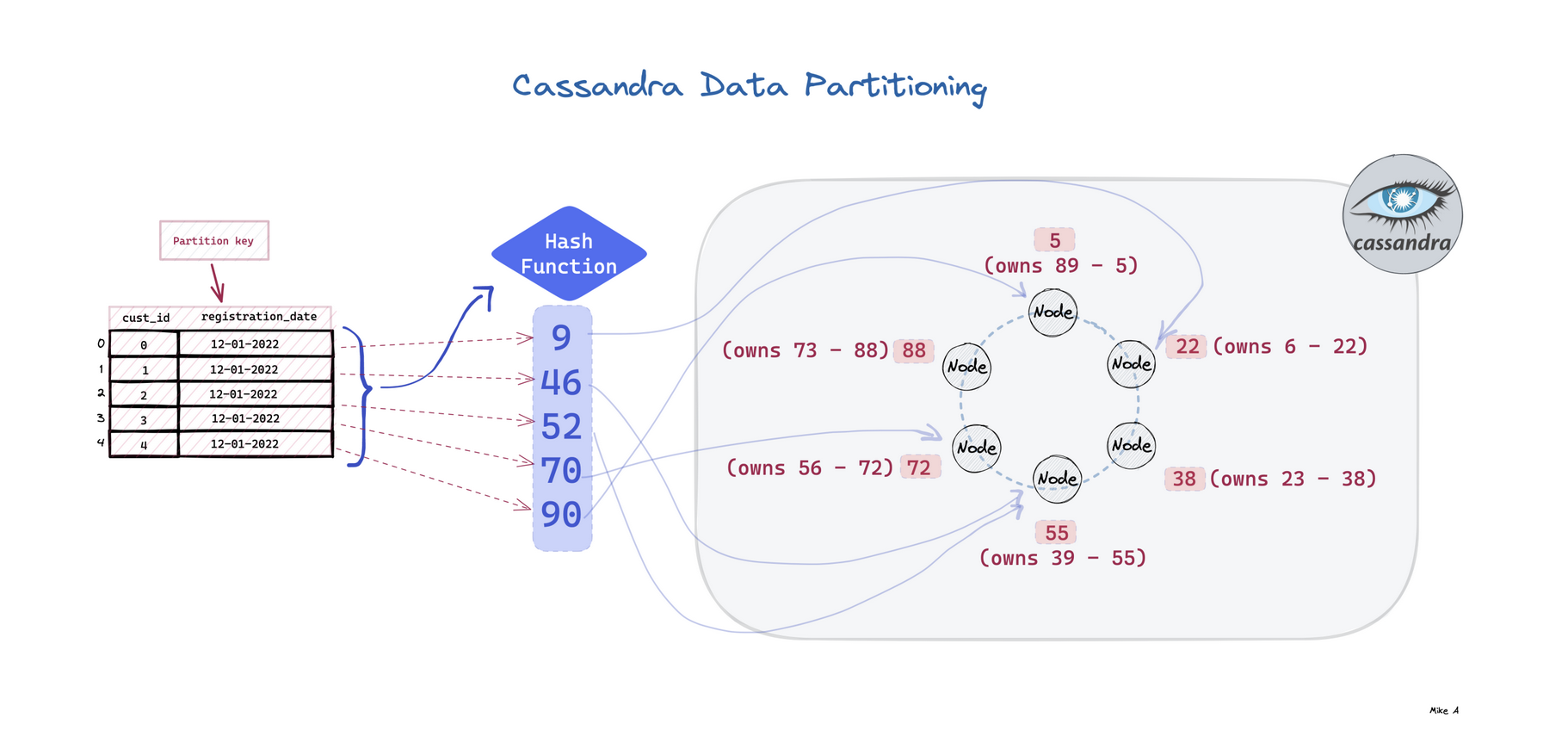
  • Partitioner: Determines how data is distributed across the nodes in the cluster.
  • Replication Strategy: Defines how many copies of data exist and where they are stored.
  • Node: A Cassandra node is a place where data is stored.
  • Data center: Data center is a collection of related nodes.
  • Cluster: A cluster is a component which contains one or more data centers.
  • Commit log: In Cassandra, the commit log is a crash-recovery mechanism. Every write operation is written to the commit log.
  • Mem-table: A mem-table is a memory-resident data structure. After commit log, the data will be written to the mem-table. Sometimes, for a single-column family, there will be multiple mem-tables.
  • SSTable: It is a disk file to which the data is flushed from the mem-table when its contents reach a threshold value.
  • Bloom filter: These are nothing but quick, nondeterministic, algorithms for testing whether an element is a member of a set. It is a special kind of cache. Bloom filters are accessed after every query.

Key Features of Apache Cassandra

Some of the features of Cassandra architecture are as follows:

  • Cassandra is designed such that it has no master or slave nodes.
  • It has a ring-type architecture, that is, its nodes are logically distributed like a ring.
  • Data is automatically distributed across all the nodes.
  • Similar to HDFS, data is replicated across the nodes for redundancy.
  • Data is kept in memory and lazily written to the disk.
  • Hash values of the keys are used to distribute the data among nodes in the cluste

https://docs.nomagic.com/display/TWCloud190SP1/Installing+and+configuring+Cassandra+on+Linux
https://youkudbhelper.wordpress.com/2020/01/29/steps-to-install-cassandra-on-linux/
https://youkudbhelper.wordpress.com/2020/05/17/how-to-add-new-vnode-to-the-existing-datacenter-in-cassandra-cluster/
https://youkudbhelper.wordpress.com/2020/05/17/steps-to-add-a-new-datacenter-to-a-cluster-in-cassandra/
https://youkudbhelper.wordpress.com/2020/05/17/steps-to-decommission-a-datacenter-in-cassandra/
https://youkudbhelper.wordpress.com/2021/09/01/list-of-handful-cassandra-commands-to-improve-productivity/
https://youkudbhelper.wordpress.com/2021/10/05/important-cassandra-questions-that-you-must-know/


Monday, December 18, 2023

Understanding Data

Understanding Data 

Data is a distinct piece of information that is gathered and translated for some purpose. Data can come in the form of text, observations, figures, images, numbers, graphs, or symbols. For example, data might include individual prices, weights, addresses, ages, names, temperatures, dates, or distances.


Types of Data

  • Structured 

  • Unstructured

  • Semi-Structured

Structured Data -  Data that is organized in a defined manner or schema, typically found in relational databases. 

  • Characteristics: • Easily queryable • Organized in rows and columns • Has a consistent structure 

  • Examples: • Database tables • CSV files with consistent columns • Excel spreadsheets


Unstructured Data - Definition: Data that doesn't have a predefined structure or schema. 

  • Characteristics: • Not easily queryable without preprocessing • May come in various formats 

  • Examples: • Text files without a fixed format • Videos and audio files • Images • Emails and word processing documents


Semi -Structured Data - Data that is not as organized as structured data but has some level of structure in the form of tags, hierarchies, or other patterns. 

  • Characteristics: • Elements might be tagged or categorized in some way • More flexible than structured data but not as chaotic as unstructured data 

  • Examples: • XML and JSON files • Email headers (which have a mix of structured fields like date, subject, etc., and unstructured data in the body) • Log files with varied formats


Properties of Data 

  • Volume 

  • Velocity 

  • Variety


Volume - Refers to the amount or size of data that organizations are dealing with at any given time. 

  • Characteristics: • May range from gigabytes to petabytes or even more • Challenges in storing, processing, and analyzing high volumes of data 

  • Examples: • A popular social media platform processing terabytes of data daily from user posts, images, and videos. • Retailers collecting years' worth of transaction data, amounting to several petabytes.


Velocity - Refers to the speed at which new data is generated, collected, and processed. 

  • Characteristics: • High velocity requires real-time or near-real-time processing capabilities • Rapid ingestion and processing can be critical for certain applications 

  • Examples: • Sensor data from IoT devices streaming readings every millisecond. • High-frequency trading systems where milliseconds can make a difference in decision-making.


Variety - Refers to the different types, structures, and sources of data. 

  • Characteristics: • Data can be structured, semi-structured, or unstructured • Data can come from multiple sources and in various formats 

  • Examples: • A business analyzing data from relational databases (structured), emails (unstructured), and JSON logs (semi-structured). • Healthcare systems collecting data from electronic medical records, wearable health devices, and patient feedback forms.


Managing Data - Data Warehouse, Data Lake & Data Lakehouse


Data Warehouse : A centralized repository optimized for analysis where data from different sources is stored in a structured format. 

  • Characteristics:  Designed for complex queries and analysis • Data is cleaned, transformed, and loaded (ETL process) • Typically uses a star or snowflake schema • Optimized for read-heavy operations 

  • Examples: • Amazon Redshift • Google BigQuery • Microsoft Azure SQL Data Warehouse


Data Lake : A storage repository that holds vast amounts of raw data in its native format, including structured, semi-structured, and unstructured data. 

  • Characteristics: Can store large volumes of raw data without predefined schema • Data is loaded as-is, no need for preprocessing • Supports batch, real-time, and stream processing • Can be queried for data transformation or exploration purposes 

  • Examples: Amazon Simple Storage Service (S3) when used as a data lake • Azure Data Lake Storage • Hadoop Distributed File System (HDFS)


Data Lakehouse : A hybrid data architecture that combines the best features of data lakes and data warehouses, aiming to provide the performance, reliability, and capabilities of a data warehouse while maintaining the flexibility, scale, and low -cost storage of data lakes. 

  • Characteristics: • Supports both structured and unstructured data. • Allows for schema-on-write and schema-on-read. • Provides capabilities for both detailed analytics and machine learning tasks. • Typically built on top of cloud or distributed architectures. • Benefits from technologies like Delta Lake, which bring ACID transactions to big data. 

  • Examples: • AWS Lake Formation (with S3 and Redshift Spectrum) • Delta Lake: An open-source storage layer that brings ACID transactions to Apache Spark and big data workloads. • Databricks Lakehouse Platform: A unified platform that combines the capabilities of data lakes and data warehouses. • Azure Synapse Analytics: Microsoft's analytics service that brings together big data and data warehousing

Monday, November 06, 2023

MySQL Best Practices - Tips

MySQL is a widely used relational database management system, and following best practices is essential to ensure performance, reliability, and security. Here are some tips and best practices for working with MySQL

Use normalized tables :

  • First Normal Form (1NF): In the first normal form, each column must contain only one value and no table should store repeating groups of related data.

  • Each column of your table should be single-valued.
  • The values stored in each column must be of the same type.
  • Each column in a table should have a unique name.
  • You can store the data in the table in any order.

  • Second Normal Form (2NF): In the second normal form, first the database must be in the first normal form, it should not store duplicate rows in the same table. And if there are duplicate values in the row, they should be stored in their own separate tables and linked to the table using foreign keys. The ideal way to a database in second normal form is to create one to many relationship tables.

  • The table should be in first normal form (1NF).
  • There should not be any partial dependency.

  • Third Normal Form (3NF): In the third normal form, the database is already in the third form, if it is in the second normal form and every non-key column is mutually independent. Identify any columns in the table that are interdependent and break those columns into their own separate tables.

  • The table should be in Second Normal Form (2NF)
  • There should not be any transitive dependency for non-prime attributes.

  • Boyce Codd Normal Form (BCNF): It is the highest form of the third normal form which deals with different types of anomalies that are not handled by the 3NF.

  • The table should be in 3NF
  • For dependency like a-> B, A should be a super key which means A cannot be a non-prime attribute if B is a prime attribute.

Refer : https://www.simplilearn.com/tutorials/sql-tutorial/what-is-normalization-in-sql

Always use proper datatype

  • One of the most important MySQL best practices is to use datatypes based on the nature of data. Using irrelevant datatypes may consume more space or lead to errors.
  •  For example: Using varchar (20) instead of DATETIME datatype for storing date time values will lead to errors in date time-related calculations. Also, it is possible that invalid data will be stored.
  • Use CHAR (1) over VARCHAR (1)  - VARCHAR (1) takes extra bytes to store information, so if you string a single character, it better to use CHAR (1).
  • Use the CHAR datatype to store only fixed length data - For example: If the length of the data is less than 1000, using char (1000) instead of varchar (1000) will consume more space.
  • Avoid using regional date formats - When using DATETIME or DATE datatype, always use the YYYY-MM-DD date format or ISO date format suitable for your SQL Engine. Regional formats like DD-MM-YYYY or MM-DD-YYYY will not be stored properly.
  • Use the smallest data types possible - avoid large char (255) text fields when a varchar or smaller char is enough. If you use the right data type, more records will fit in memory or index key block. This leads to fewer reads and faster performance.
  • Use ENUM rather than VARCHAR

 Best Practices for InnoDB Tables

  • Specify a primary key for every table using the most frequently queried column or columns, or an auto-increment value if there is no obvious primary key.
  • Use joins wherever data is pulled from multiple tables based on identical ID values from those tables. For fast join performance, define foreign keys on the join columns, and declare those columns with the same data type in each table. Adding foreign keys ensures that referenced columns are indexed, which can improve performance. Foreign keys also propagate deletes and updates to all affected tables, and prevent insertion of data in a child table if the corresponding IDs are not present in the parent table.
  • Turn off autocommit. Committing hundreds of times a second puts a cap on performance (limited by the write speed of your storage device).
  • Group sets of related DML operations into transactions by bracketing them with START TRANSACTION and COMMIT statements. While you don't want to commit too often, you also don't want to issue huge batches of INSERT, UPDATE, or DELETE statements that run for hours without committing.
  • Do not use LOCK TABLES statements. InnoDB can handle multiple sessions all reading and writing to the same table at once without sacrificing reliability or high performance. To get exclusive write access to a set of rows, use the SELECT ... FOR UPDATE syntax to lock just the rows you intend to update.
  • Enable the innodb_file_per_table variable or use general tablespaces to put the data and indexes for tables into separate files instead of the system tablespace. The innodb_file_per_table variable is enabled by default.
  •  Evaluate whether your data and access patterns benefit from the InnoDB table or page compression features. You can compress InnoDB tables without sacrificing read/write capability.
  • Run the server with the --sql_mode=NO_ENGINE_SUBSTITUTION option to prevent tables from being created with storage engines that you do not want to use.

Optimizing SELECT Statements

The main considerations for optimizing queries are:

  • To make a slow SELECT ... WHERE query faster, the first thing to check is whether you can add an index. Set up indexes on columns used in the WHERE clause, to speed up evaluation, filtering, and the final retrieval of results. To avoid wasted disk space, construct a small set of indexes that speed up many related queries used in your application.
  •  Indexes are especially important for queries that reference different tables, using features such as joins and foreign keys. You can use the EXPLAIN statement to determine which indexes are used for a SELECT. Optimizing Queries with EXPLAIN”.
  • If a performance issue is not easily solved by one of the basic guidelines, investigate the internal details of the specific query by reading the EXPLAIN plan and adjusting your indexes, WHERE clauses, join clauses, and so on. (When you reach a certain level of expertise, reading the EXPLAIN plan might be your first step for every query.)
  • Isolate and tune any part of the query, such as a function call, that takes excessive time. Depending on how the query is structured, a function could be called once for every row in the result set, or even once for every row in the table, greatly magnifying any inefficiency.
  • Minimize the number of full table scans in your queries, particularly for big tables.
  • Keep table statistics up to date by using the ANALYZE TABLE statement periodically, so the optimizer has the information needed to construct an efficient execution plan.
  • Avoid transforming the query in ways that make it hard to understand, especially if the optimizer does some of the same transformations automatically.
  • Deal with locking issues, where the speed of your query might be affected by other sessions accessing the tables at the same time.

Here are some types of optimizations MySQL knows how to do: -

  • Reordering joins
  • Converting OUTER JOINs to INNER JOINs
  • Applying algebraic equivalence rules
  • COUNT(), MIN(), and MAX() optimizations
  • Evaluating and reducing constant expressions
  • Use Covering indexes
  • Subquery optimization
  • Early termination
  • Equality propagation
  • IN() list comparisons
  • Use SELECT * only if needed
  • Use ORDER BY Clause only if needed

Few More :

  • Partition Large Tables: For tables with a large number of rows, consider partitioning to improve query performance and management.
  • Use Connection Pooling: Connection pooling helps manage and reuse database connections, reducing the overhead of opening and closing connections for each query.
  • Cache Frequently Used Queries: Implement query caching mechanisms like MySQL Query Cache or use external caching systems like Memcached or Redis to reduce query load on the database server.
  • Regularly Review and Tune: Regularly review and tune your MySQL setup based on the changing needs of your applications.

Tuesday, October 03, 2023

Standard Methods - Network protocols

Network protocols are standard methods of transferring data between two computers in a network.


1. HTTP (HyperText Transfer Protocol)
HTTP is a protocol for fetching resources such as HTML documents. 
It is the foundation of any data exchange on the Web and it is a client-server protocol.

2. HTTP/3
HTTP/3 is the next major revision of the HTTP. It runs on QUIC, 
a new transport protocol designed for mobile-heavy internet usage. 
It relies on UDP instead of TCP, which enables faster web page responsiveness. 
VR applications demand more bandwidth to render intricate details of a virtual scene and 
will likely benefit from migrating to HTTP/3 powered by QUIC.

3. HTTPS (HyperText Transfer Protocol Secure)
HTTPS extends HTTP and uses encryption for secure communications.

4. WebSocket
WebSocket is a protocol that provides full-duplex communications over TCP. 
Clients establish WebSockets to receive real-time updates from the back-end services. 
Unlike REST, which always “pulls” data, WebSocket enables data to be “pushed”. Applications, 
like online gaming, stock trading, and messaging apps leverage WebSocket for real-time 
communication.

5. TCP (Transmission Control Protocol)
TCP is is designed to send packets across the internet and ensure the successful delivery of 
data and messages over networks. Many application-layer protocols build on top of TCP.

6. UDP (User Datagram Protocol)
UDP sends packets directly to a target computer, without establishing a connection first. 
UDP is commonly used in time-sensitive communications where occasionally dropping packets 
is better than waiting. Voice and video traffic are often sent using this protocol.

7. SMTP (Simple Mail Transfer Protocol)
SMTP is a standard protocol to transfer electronic mail from one user to another.

8. FTP (File Transfer Protocol)
FTP is used to transfer computer files between client and server. 
It has separate connections for the control channel and data channel.


Friday, September 22, 2023

Install MySQL 8 on Different Operating Systems

  • INSTALL MYSQL 8 ON CENTOS/REHAT

  ### INSTALLATION STEPS STEP 1. DOWNLOAD MYSQL 8 REPOSITORY PACKAGE wget https://repo.mysql.com/mysql80-community-release-el7-3.noarch.rpm STEP 2. INSTALL MYSQL REPO LOCALLY sudo yum localinstall mysql80-community-release-el7-3.noarch.rpm STEP 3. Import Public Key for MySQL 8 sudo rpm --import https://repo.mysql.com/RPM-GPG-KEY-mysql-2022 STEP 4. INSTALL MYSQL SERVER sudo yum install mysql-community-server STEP 5. ENABLE MYSQL SERVICE TO AUTO-START ON REBOOT sudo systemctl enable mysqld.service STEP 6. START MYSQL SERVICE sudo systemctl start mysqld.service STEP 7. CHECK STATUS OF MYSQL SERVICE systemctl status mysqld ### VERIFICATION pidof mysqld netstat -ntlp | grep 3306 sudo lsof -u mysql

Basics of Kubernetes

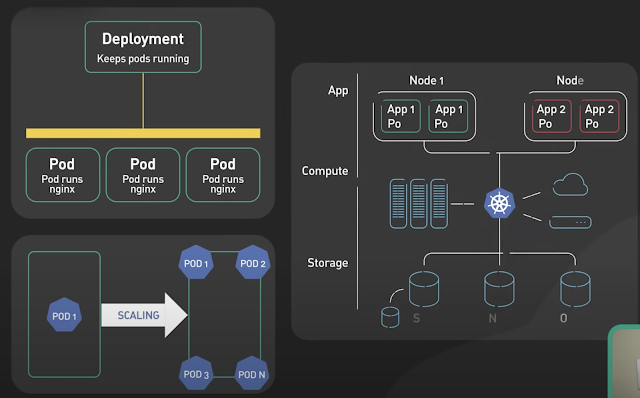
 Kubernetes, often abbreviated as K8s , is an open-source platform designed to automate the deployment, scaling, and management of container...