ALTER TABLE tablename AUTO_INCREMENT = value;
eg.
If I had a items table and I created a few new items and then deleted them, to set the auto increment value back to ‘100′ i would simply:
ALTER TABLE items AUTO_INCREMENT = 100;
ALTER TABLE tablename AUTO_INCREMENT = value;
ALTER TABLE items AUTO_INCREMENT = 100;
# by setting the variable "err-log"
# in the [safe_mysqld] section as follows:
#
# [safe_mysqld]
# err-log=/var/lib/mysql/mysqld.log
#
# If the root user has a password you have to create a
# /root/.my.cnf configuration file with the following
# content:
#
# [mysqladmin]
# password =
# user= root
#
# where "" is the password.
#
# ATTENTION: This /root/.my.cnf should be readable ONLY
# for root !
/var/lib/mysql/mysqld.log {
# create 600 mysql mysql
notifempty
daily
rotate 3
missingok
compress
postrotate
# just if mysqld is really running
if test -x /usr/bin/mysqladmin && \
/usr/bin/mysqladmin ping &>/dev/null
then
/usr/bin/mysqladmin flush-logs
fi
endscript
}
# This logname can be set in /etc/my.cnf
# by setting the variable "err-log"
# in the [safe_mysqld] section as follows:
#
# [safe_mysqld]
# err-log=/var/lib/mysql/mysqld.log
#
# If the root user has a password you have to create a
# /root/.my.cnf configuration file with the following
# content:
#
# [mysqladmin]
# password =
# user= root
#
# where "" is the password.
#
# ATTENTION: This /root/.my.cnf should be readable ONLY
# for root !
# - I put everything in one block and added sharedscripts, so that mysql gets
# flush-logs'd only once.
# Else the binary logs would automatically increase by n times every day.
# - The error log is obsolete, messages go to syslog now.
/var/log/mysql/mysql.log /var/log/mysql/mysql-slow.log {
daily
rotate 7
missingok
create 640 mysql adm
compress
sharedscripts
postrotate
test -x /usr/bin/mysqladmin || exit 0
# If this fails, check debian.conf!
export HOME=/etc/mysql/my.cnf
MYADMIN="/usr/bin/mysqladmin --defaults-file=/etc/mysql/debian.cnf"
if [ -z "`$MYADMIN ping 2>/dev/null`" ]; then
# Really no mysqld or rather a missing debian-sys-maint user?
# If this occurs and is not a error please report a bug.
if ps cax | grep -q mysqld; then
exit 1
fi
else
$MYADMIN flush-logs
fi
endscript
[mysqladmin]
password = xxxx
user= root

top - 22:09:08 up 14 min, 1 user, load average: 0.21, 0.23, 0.30
Tasks: 81 total, 1 running, 80 sleeping, 0 stopped, 0 zombie
Cpu(s): 9.5%us, 31.2%sy, 0.0%ni, 27.0%id, 7.6%wa, 1.0%hi, 23.7%si, 0.0%st
Mem: 255592k total, 167568k used, 88024k free, 25068k buffers
Swap: 524280k total, 0k used, 524280k free, 85724k cached
PID USER PR NI VIRT RES SHR S %CPU %MEM TIME+ COMMAND
3166 apache 15 0 29444 6112 1524 S 6.6 2.4 0:00.79 httpd
3161 apache 15 0 29444 6112 1524 S 5.9 2.4 0:00.79 httpd
3164 apache 15 0 29444 6112 1524 S 5.9 2.4 0:00.75 httpd
3169 apache 15 0 29444 6112 1524 S 5.9 2.4 0:00.74 httpd
3163 apache 15 0 29444 6112 1524 S 5.6 2.4 0:00.76 httpd
3165 apache 15 0 29444 6112 1524 S 5.6 2.4 0:00.77 httpd
3167 apache 15 0 29444 6112 1524 S 5.3 2.4 0:00.73 httpd
3162 apache 15 0 29444 6112 1524 S 5.0 2.4 0:00.77 httpd
3407 root 16 0 2188 1012 816 R 1.7 0.4 0:00.51 top
240 root 15 0 0 0 0 S 0.3 0.0 0:00.08 pdflush
501 root 10 -5 0 0 0 S 0.3 0.0 0:01.20 kjournald
2794 root 18 0 12720 1268 560 S 0.3 0.5 0:00.73 pcscd
1 root 15 0 2060 636 544 S 0.0 0.2 0:03.81 init
2 root RT -5 0 0 0 S 0.0 0.0 0:00.00 migration/0
3 root 34 19 0 0 0 S 0.0 0.0 0:00.00 ksoftirqd/0
4 root RT -5 0 0 0 S 0.0 0.0 0:00.00 watchdog/0
5 root 10 -5 0 0 0 S 0.0 0.0 0:00.07 events/0

b. Keep your bookmark online, few sites gives service to keep the bookmarks online and it will sync data between your firefok and there server. Just you need to create account there one of such site is http://www.mybookmarks.com/.
c. This will take backup of all your Firefox Extentions along with bookmarks. What you need to do install FEBE (Firefox Environment Backup Extension). There is another extension CLEO(Compact Library Extension Organizer) that can be used to combine all the extension and make it as a single extension file. it can also be very help full if you have your own custom made extension.
source :
http://mozilla.gunnars.net/firefox_bookmarks_tutorial.html
http://prabhanjan-panigrahi.blogspot.com/2008/11/backup-your-firefox-extentions-and.html
A Physical Volume, containing Physical Extents:

+-----[ Physical Volume ]------+
| PE | PE | PE | PE | PE | PE  |
+------------------------------+

A Volume Group, containing 2 Physical Volumes (PVs) with 6 Physical Extents:

+------[ Volume Group ]-----------------+
|  +--[PV]--------+  +--[PV]---------+  |
|  | PE | PE | PE |  | PE | PE | PE  |  |
|  +--------------+  +---------------+  |
+---------------------------------------+

We now further expand this:

+------[ Volume Group ]-----------------+
|  +--[PV]--------+  +--[PV]---------+  |
|  | PE | PE | PE |  | PE | PE | PE  |  |
|  +--+---+---+---+  +-+----+----+---+  |
|     |   |   | +-----/     |    |      |
|     |   |   | |           |    |      |
|   +-+---+---+-+      +----+----+--+   |
|   |  Logical  |      |  Logical   |   |
|   |  Volume   |      |   Volume   |   |
|   |           |      |            |   |
|   |  /home    |      |    /var    |   |
|   +-----------+      +------------+   |
+---------------------------------------+
[global]
log file = /var/log/samba/%m.log
log level = 2
load printers = yes
idmap gid = 16777216-33554431
socket options = TCP_NODELAY SO_RCVBUF=8192 SO_SNDBUF=8192
winbind use default domain = no
template shell = /bin/false
wins support = yes
dns proxy = no
netbios name = samba
domain master = yes
preferred master = yes
cups options = raw
server string = Samba PDC
idmap uid = 16777216-33554431
workgroup = OFFICE
os level = 64
domain logons = yes
add user script = /usr/sbin/useradd -m '%u'
delete user script = /usr/sbin/userdel -r '%u'
add group script = /usr/sbin/groupadd '%g'
delete group script = /usr/sbin/groupdel '%g'
add user to group script = /usr/sbin/usermod -G '%g' '%u'
set primary group script = /usr/sbin/usermod -g '%g' '%u'
add machine script = /usr/sbin/useradd -s /bin/false -d /dev/null '%u'
logon script = scripts\logon.bat
passdb backend = tdbsam
printcap name = /etc/printcap
security = user
max log size = 50
hosts allow = 10.1.
[homes]
comment = Home Directories
valid users = %S
browseable = No
writable = Yes
# Un-comment the following and create the netlogon directory for Domain Logons
[netlogon]
comment = Network Logon Service
logon path = \\%L\profiles\%U
logon home = \\%L\%U\.9xprofile
logon drive = p:
browseable = no
writable = no
; share modes = no
#less /proc/mdstat
#mdadm --detail /dev/md0
#mdadm /dev/md0 -r /dev/sdb0
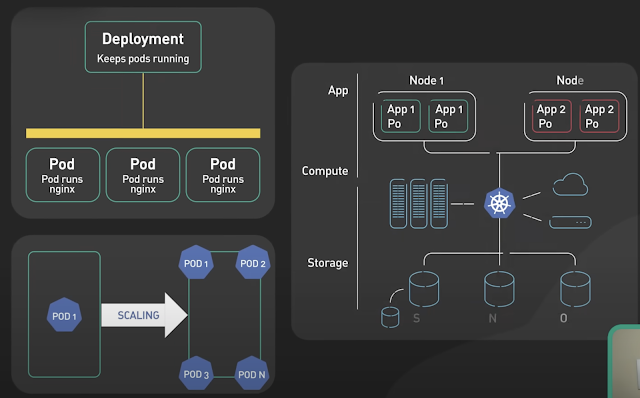
Kubernetes, often abbreviated as K8s , is an open-source platform designed to automate the deployment, scaling, and management of container...