-> Openfire
1 . lynx http://www.igniterealtime.org/downloads/download-landing.jsp?file=openfire/openfire-3.4.5-1.i386.rpm
2 . rpm -ivh openfire-3.4.5-1.i386.rpm
3 . /etc/rc.d/init.d/openfire status
4 . /etc/rc.d/init.d/openfire start
5. Make sure that the firewall is stopped.
6 . http://www.grmtech.com:9090/
7 . From the plugin tab in the web based admin control panel: installed Asterisk-IM Openfire
-> Spark
Download and install on client system.
http://www.igniterealtime.org/downloadServlet?filename=spark/spark_2_5_8.exe
-> web chat
Go to plugin tab in the web based admin control panel:
1.Click on 'Available Plugins'
2. Install the following plugin
a. Spark Fastpath Webchat
b. Fastpath Service
c. Monitoring Service (its is a optional)
Friday, May 02, 2008


How to make a linux server act as a gateway
1. turned on IP forwarding in sysctl.conf by setting the value to 1
2. gave the ip tables command for nat masquerade.
iptables -t nat -A POSTROUTING -o eth0 -j MASQUERADE
iptables -t nat -A POSTROUTING -o eth1 -j MASQUERADE
Checked that the commands took effect by:
iptables-save
and then made the entries from iptables-save inside the file /etc/sysconfig/iptables
2. gave the ip tables command for nat masquerade.
iptables -t nat -A POSTROUTING -o eth0 -j MASQUERADE
iptables -t nat -A POSTROUTING -o eth1 -j MASQUERADE
Checked that the commands took effect by:
iptables-save
and then made the entries from iptables-save inside the file /etc/sysconfig/iptables
Check and Rebuilding failed Linux software RAID
# cat /proc/mdstat
# mdadm -D /dev/md0
Detail : http://sitearticles.com/cms/show/43.html
# mdadm -D /dev/md0
Detail : http://sitearticles.com/cms/show/43.html
ssh commands to log in without the password
ssh commands to log in without the password
# ssh-keygen -t rsa
* This will generate your id_rsa and id_rsa.pub in the .ssh directory in your home directory
* copy the id_rsa.pub to the .ssh directory of the remote host you want to logon to as authorized_keys2
* If you have more than one host from which you want to connect to the remote host, you need to add the local host's id_rsa.pub as one line in the authorized_keys2 file of the remote host command for the 1and1 servers is:
# scp .ssh/id_rsa.pub u35894953@217.160.226.69:./.ssh/authorized_keys2
:)
# ssh-keygen -t rsa
* This will generate your id_rsa and id_rsa.pub in the .ssh directory in your home directory
* copy the id_rsa.pub to the .ssh directory of the remote host you want to logon to as authorized_keys2
* If you have more than one host from which you want to connect to the remote host, you need to add the local host's id_rsa.pub as one line in the authorized_keys2 file of the remote host command for the 1and1 servers is:
# scp .ssh/id_rsa.pub u35894953@217.160.226.69:./.ssh/authorized_keys2
:)
Sunday, April 13, 2008
Apache: Proxy and ReverseProxy Server
Redirect your all traffic:
Case:
example.com A record is point to server with IP10.1.31.7 (mean its resolves to IP 10.1.31.7 ), but you are running your web server from example.com on server with IP 10.1.31.8.
So, you want all traffic coming to 10.1.31.7 will redirect to 10.1.31.8.
Do the following changes on server have IP 10.1.31.7 :
1. Run apache.
2. Do the following entry in apache.
a. NameVirtualHost 10.1.31.7
b <VirtualHost 10.1.31.7:80 >
ServerName example.com
ServerAlias www.example.com
DocumentRoot /home/test
ProxyRequests off
ProxyPass / http://www.example.com/
ProxyPassReverse / http://www.example.com/
<Location />
ProxyPassReverse /
</Location>
</VirtualHost>
3. Do the following entry in /etc/hosts.
10.1.31.8 example.com
10.1.31.8 www.example.com
(make sure once you #ping example.com from 10.1.31.7 it resolver's to 10.1.31.8).
Note: its redirect only http request not https.
more you can see on this link
Case:
example.com A record is point to server with IP10.1.31.7 (mean its resolves to IP 10.1.31.7 ), but you are running your web server from example.com on server with IP 10.1.31.8.
So, you want all traffic coming to 10.1.31.7 will redirect to 10.1.31.8.
Do the following changes on server have IP 10.1.31.7 :
1. Run apache.
2. Do the following entry in apache.
a. NameVirtualHost 10.1.31.7
b <VirtualHost 10.1.31.7:80 >
ServerName example.com
ServerAlias www.example.com
DocumentRoot /home/test
ProxyRequests off
ProxyPass / http://www.example.com/
ProxyPassReverse / http://www.example.com/
<Location />
ProxyPassReverse /
</Location>
</VirtualHost>
3. Do the following entry in /etc/hosts.
10.1.31.8 example.com
10.1.31.8 www.example.com
(make sure once you #ping example.com from 10.1.31.7 it resolver's to 10.1.31.8).
Note: its redirect only http request not https.
more you can see on this link
Saturday, April 12, 2008
Removing all blank lines, leading and trailing blank spaces
Removing all blank lines, leading and trailing blank spaces :
#sed '/^$/d; s/^[ ]*//g; s/[ ]*$//g' prabhat.txt > kumar.txt
This command will create new file (kumar.txt) on which it removes blank lines, leading and trailing blank spaces.
#sed '/^$/d; s/^[ ]*//g; s/[ ]*$//g' prabhat.txt > kumar.txt
This command will create new file (kumar.txt) on which it removes blank lines, leading and trailing blank spaces.
Friday, April 11, 2008
Changing Run Levels
On production environment normal run level 3 is used and it get rarely changed.
Runlevel and usage:
#who -r or #runlevel
Change run level using:-
#telinit 5 or
open file
#emacs /etc/inittab
Look for the default runlevel called initdefault which look like as follows:
id:3:initdefault:
Replace run level x with y (where x is current run level and y you want to set).
Set services in run level using :
#ntsysv or
#chkconfig or
#serviceconf
Runlevel and usage:
- 0 — Halt
- 1 — Single-user mode
- 2 — Not used (user-definable)
- 3 — Full multi-user mode
- 4 — Not used (user-definable)
- 5 — Full multi-user mode (with an X-based login screen)
- 6 — Reboot
#who -r or #runlevel
Change run level using:-
#telinit 5 or
open file
#emacs /etc/inittab
Look for the default runlevel called initdefault which look like as follows:
id:3:initdefault:
Replace run level x with y (where x is current run level and y you want to set).
Set services in run level using :
#ntsysv or
#chkconfig or
#serviceconf
Tuesday, April 01, 2008
How To: Transfer your PuTTY settings between computers
Putty stores its settings in the Windows registry. To save a backup of your Putty settings, you'll need to export this registry key to a file.
HKEY_CURRENT_USER\Software\SimonTatham
Steps :
1. Click Start->Run and type "RegEdt32" in the "Open" dialog. Click "Ok"
2. One RegEdt32 starts, you'll be presented with an application.
3. Press "Ctrl+F" to bring up the Find dialog. Enter the name of the key, "SimonTratham" in the "Find What" field, and make sure only "Keys" is checked in the "Look At" section of the dialog. Finally, click "Find Next"
4. The search may take a while, reminding us that the Windows Registry is a large and mysterious place where dragons be. Let's use these few seconds to reflect on the fact that you should never, ever, never change things in the registry unless you are absolutely, positively, totally, completely, 100% dead sure that you know exactly what you're doing. When the search completes we'll see the key name for which we're looking.
5. Click File->Export. Give your file an appropriate name like, "putty.reg" and click "Save"
6. We're done! Save the putty.reg file somewhere safe. The file doesn't contain any passwords or actual SSH key values so, it's relatively safe from prying eyes. Still, it does contain your configuration and that kind of data is a private matter.
Importing Your PuTTy Configuration:
Windows will ask you for confirmation that you want to import this set of registry values. We know this file is safe, because we created it but, you should never import registry information from an unknown source
HKEY_CURRENT_USER\Software\SimonTatham
Steps :
1. Click Start->Run and type "RegEdt32" in the "Open" dialog. Click "Ok"
2. One RegEdt32 starts, you'll be presented with an application.
3. Press "Ctrl+F" to bring up the Find dialog. Enter the name of the key, "SimonTratham" in the "Find What" field, and make sure only "Keys" is checked in the "Look At" section of the dialog. Finally, click "Find Next"
4. The search may take a while, reminding us that the Windows Registry is a large and mysterious place where dragons be. Let's use these few seconds to reflect on the fact that you should never, ever, never change things in the registry unless you are absolutely, positively, totally, completely, 100% dead sure that you know exactly what you're doing. When the search completes we'll see the key name for which we're looking.
5. Click File->Export. Give your file an appropriate name like, "putty.reg" and click "Save"
6. We're done! Save the putty.reg file somewhere safe. The file doesn't contain any passwords or actual SSH key values so, it's relatively safe from prying eyes. Still, it does contain your configuration and that kind of data is a private matter.
Importing Your PuTTy Configuration:
Windows will ask you for confirmation that you want to import this set of registry values. We know this file is safe, because we created it but, you should never import registry information from an unknown source
Wednesday, March 19, 2008
Remove all empty directories
$ cleanlinks
this is supported on few flavor of Linux (XFree86), you can use this script.
#/bin/bash
DIR="$1"
[ -d $DIR ] && [ $(ls -l $DIR | wc -l) -eq 1 ] && rmdir $DIR || :
$ script.sh dir1
this is supported on few flavor of Linux (XFree86), you can use this script.
#/bin/bash
DIR="$1"
[ -d $DIR ] && [ $(ls -l $DIR | wc -l) -eq 1 ] && rmdir $DIR || :
$ script.sh dir1
Removing blank line from file
Using sed.
$ sed '/^$/d' withblankline.txt > withoutblankline.txt
Using grep.
$ grep -v '^$' withblankline.txt > withoutblankline.txt
Use following for loop (shell script) to remove all blank lines from all files stored in /home/prabhat/data directory:
$ sed '/^$/d' withblankline.txt > withoutblankline.txt
Using grep.
$ grep -v '^$' withblankline.txt > withoutblankline.txt
Use following for loop (shell script) to remove all blank lines from all files stored in /home/prabhat/data directory:
#!/bin/sh
files="/home/prabhat/data/*.txt"
for f in $files
do
sed '/^$/d' $i > $i.out
mv $i.out $i
done
How to check reverse DNS
The DNS is used to determine what IP address is associated with a given host name, so to reverse resolve a known IP address is to lookup what the associated host name for it. A reverse lookup is often referred to simply as reverse resolving, or more specifically reverse DNS lookups.
Use of reverse DNS.
Check reverse DNS for given IP address under Linux or Windows XP/Server 2003.
You can use standard UNIX / Linux utilities such as nslookup, dig or hosts to find out reverse DNS of a given IP address.
eg; under Linux/UNIX/
$ host 66.65.123.34
or
dig -x IP (66.65.123.34)
and under Linux/UNIX/Windows
nslookup 66.65.123.34
Use of reverse DNS.
Anti-spam
Network troubleshooting
Avoid spammers and phishers using a forward confirmed reverse DNS etc
Check reverse DNS for given IP address under Linux or Windows XP/Server 2003.
You can use standard UNIX / Linux utilities such as nslookup, dig or hosts to find out reverse DNS of a given IP address.
eg; under Linux/UNIX/
$ host 66.65.123.34
or
dig -x IP (66.65.123.34)
and under Linux/UNIX/Windows
nslookup 66.65.123.34
Monday, January 07, 2008
ssh warning
This is not a big thing, but sometime this small things matter a lot.
You can put a message on remote ssh login for user or it will just act as a warning for a defaulters.
Steps:
1. Open a file using : emacs /etc/motd and write a messge you want
e.g.
********************************************************************
* *
* This system is for the use of authorized users only. Usage of *
* this system may be monitored and recorded by system personnel. *
* *
* Anyone using this system expressly consents to such monitoring *
* and is advised that if such monitoring reveals possible *
* evidence of criminal activity, system personnel may provide the *
* evidence from such monitoring to law enforcement officials. *
* *
********************************************************************
==========================================================
Unauthorized access to this machine is prohibited
Pressif you are not an authorized user
2. Save the file and exist.
3. Restart the ssh service using. #service sshd restart
You can put a message on remote ssh login for user or it will just act as a warning for a defaulters.
Steps:
1. Open a file using : emacs /etc/motd and write a messge you want
e.g.
********************************************************************
* *
* This system is for the use of authorized users only. Usage of *
* this system may be monitored and recorded by system personnel. *
* *
* Anyone using this system expressly consents to such monitoring *
* and is advised that if such monitoring reveals possible *
* evidence of criminal activity, system personnel may provide the *
* evidence from such monitoring to law enforcement officials. *
* *
********************************************************************
==========================================================
Unauthorized access to this machine is prohibited
Press
2. Save the file and exist.
3. Restart the ssh service using. #service sshd restart
Wednesday, October 24, 2007
Install GNU/Linux without any CD, floppy, USB-key, nor any other removable media
Install GNU/Linux without any CD, floppy, USB-key, nor any other removable media
I have a server running CentOS 4 with internet on it. This server is without any CD Drive, floppy Drive, USB-key, nor any other removable media and its Remote server.
How do i install CentOS 5 on it? I have searched in various forums, posted in various forums.
After a long hour I have came to solution.
I am writting here what excataly I have done.
Since, I have net connection on current system,
1. I have downloaded ISO image of centos 5 (1 CD only)
2. mkdir /mnt/tmp
3. mount -o loop CentOS-5.0-x86_64-bin-1of7.iso /mnt/tmp
4. cp -a /mnt/tmp/isolinux/vmlinuz /boot/vmlinuzMy
5. cp -a /mnt/tmp/isolinux/initrd.img /boot/initrdMy.img
6. umount /mnt/tmp
7. Add entry to your /etc/grub.conf
title Fedora Core 2 Installation
root (hd0,0) kernel /boot/vmlinuzMy
initrd /boot/initrdMy.img
8. Reboot system
9. Now your is booted and ready for new installation.
10. Select installation method you want (FTP, HTTP or NFS probably). I have selected http
11. Give your Name server and ipdetails.
12. Give site & Dir (I have given)
mirror.stanford.edu
/yum/pub/centos/5/os/x86_64/
I think its ok to install now :)
I have a server running CentOS 4 with internet on it. This server is without any CD Drive, floppy Drive, USB-key, nor any other removable media and its Remote server.
How do i install CentOS 5 on it? I have searched in various forums, posted in various forums.
After a long hour I have came to solution.
I am writting here what excataly I have done.
Since, I have net connection on current system,
1. I have downloaded ISO image of centos 5 (1 CD only)
2. mkdir /mnt/tmp
3. mount -o loop CentOS-5.0-x86_64-bin-1of7.iso /mnt/tmp
4. cp -a /mnt/tmp/isolinux/vmlinuz /boot/vmlinuzMy
5. cp -a /mnt/tmp/isolinux/initrd.img /boot/initrdMy.img
6. umount /mnt/tmp
7. Add entry to your /etc/grub.conf
title Fedora Core 2 Installation
root (hd0,0) kernel /boot/vmlinuzMy
initrd /boot/initrdMy.img
8. Reboot system
9. Now your is booted and ready for new installation.
10. Select installation method you want (FTP, HTTP or NFS probably). I have selected http
11. Give your Name server and ipdetails.
12. Give site & Dir (I have given)
mirror.stanford.edu
/yum/pub/centos/5/os/x86_64/
I think its ok to install now :)
Thursday, October 18, 2007
System Security Monitor root access
Security of the server always come first , especially web server which access by the worldwide and hackers always keep eyes on those server's.
So, its good if you have system which automatically send a email notification via email whenever someone logs in as root on your system.
To configure the automatic email alert notification to a email address on each incident of root log on on the server, use the following guide.
Login to the server via SSH using as root ID.
So, its good if you have system which automatically send a email notification via email whenever someone logs in as root on your system.
To configure the automatic email alert notification to a email address on each incident of root log on on the server, use the following guide.
Login to the server via SSH using as root ID.
- Ensure that you’re at home directory of root. The open up the .bash_profile for editing using pico or vi by typing one of the following commands at linux command shell:
pico .bash_profilevi .bash_profile - Scroll down to the end of the file and add the following line:
echo 'ALERT - Root Shell Access on:' `date` `who` mail -s "Alert: Root Access from `who cut -d"(" -f2 cut -d")" -f1`" user@example.com
Replace user@email.com with the actual email account address that you want to the root access alert notification been sent to. Note that you can change the text contains in the email alert too. The text starting with first ALERT is written as email body, and you can add in other info such as host name or change the wordings. The second Alert is the email title which you can change to your own too.
Note that you can change the text contains in the email alert too. The text starting with first ALERT is written as email body, and you can add in other info such as host name or change the wordings. The second Alert is the email title which you can change to your own too.
Now logout and login again as root, you should receive an email alert at your inbox. The security trick should works on most popular flavor of Linux such as RedHat, CentOS, Ubuntu, FreeBSD and etc.
Saturday, September 15, 2007
Trademark Problem
I am Technical guy I am totally unaware of trademark related things.
But you must be thinking in admin Linux blog I am talking about trademark what happen to this guy. Believe me I am not crazy.
One day I got this comment:
"
Dear Mr. Kumar,Your "Open Hearts" header presents a bit of a problem for us as we hold the international trademark for "Open hearts. Open minds. Open doors." We ask you, kindly, to please remove this statement from your blog. If you have any questions, please contact us at im@umcom.org. --The United Methodist Church.
"
"Open Hearts, Open Minds, Open Doors... Open Source" yes this Title Description is trademark to someone.
Now just I reshuffled this and made it to “Open Minds, Open Hearts, Open Doors... Open Source"
Hope this will not create any problem.
But you must be thinking in admin Linux blog I am talking about trademark what happen to this guy. Believe me I am not crazy.
One day I got this comment:
"
Dear Mr. Kumar,Your "Open Hearts" header presents a bit of a problem for us as we hold the international trademark for "Open hearts. Open minds. Open doors." We ask you, kindly, to please remove this statement from your blog. If you have any questions, please contact us at im@umcom.org. --The United Methodist Church.
"
"Open Hearts, Open Minds, Open Doors... Open Source" yes this Title Description is trademark to someone.
Now just I reshuffled this and made it to “Open Minds, Open Hearts, Open Doors... Open Source"
Hope this will not create any problem.
Thursday, September 13, 2007
Backup strategy
Backup strategy:
In computer world most important thing is DATA. No system can 100% secure or fault tolerance, so we always worry & care about data.
Various organization follows different back strategy. Like daily, weekly, monthly or yearly and at different levels.
Once my CEO asked me to design the backup system, and then I study various backup system, algorithms and architectures.
Then I come up with this backup architecture
Level 0 - Hard disk backup using RAID -1 mirroring, its purpose is to use in the case of hardware failure.
Level 1 – OS backup using rsnapshot. It is a file system backup utility based on rsyn, using rsnapshot; it is possible to take snapshots of your file systems at different points in time. Its purpose is to use in the case of OS failure.
Level 2 – Application data backup on same data center using Rsync. Its purpose is to use in the case of application failure.
Level 3 – Application data backup at remote location. Its purpose is to use in the case of data center failure.
As you move from level – 0 to level -3, you have to take more revisions like hours 1, day 1, week 1, and year.
I think this is quit good backup strategy.
In computer world most important thing is DATA. No system can 100% secure or fault tolerance, so we always worry & care about data.
Various organization follows different back strategy. Like daily, weekly, monthly or yearly and at different levels.
Once my CEO asked me to design the backup system, and then I study various backup system, algorithms and architectures.
Then I come up with this backup architecture
Level 0 - Hard disk backup using RAID -1 mirroring, its purpose is to use in the case of hardware failure.
Level 1 – OS backup using rsnapshot. It is a file system backup utility based on rsyn, using rsnapshot; it is possible to take snapshots of your file systems at different points in time. Its purpose is to use in the case of OS failure.
Level 2 – Application data backup on same data center using Rsync. Its purpose is to use in the case of application failure.
Level 3 – Application data backup at remote location. Its purpose is to use in the case of data center failure.
As you move from level – 0 to level -3, you have to take more revisions like hours 1, day 1, week 1, and year.
I think this is quit good backup strategy.
Monday, June 25, 2007
Xen : virtualization software
In my previous blog post I was talked about Virtualization.
Now I am writting about XEN , It is software that runs on a host operating system and allows one to run several guest operating systems on top of the host on the same computer hardware at the same time. Xen Software which enabling every server to support multiple virtual servers. It is the fastest and most secure virtualization software.
In Xen virtualization, a thin software layer known as the Xen hypervisor ( open source technology, developed collaboratively by the world’s best engineers at over 20 of the most innovative data center solution vendors, including Intel, AMD, Cisco, Dell, Egenera, HP, IBM, Mellanox, Network Appliance, Novell, Red Hat, SGI, Sun, Unisys, Veritas, Voltaire, and of course, XenSource ) is inserted between the server’s hardware and the operating system.
This provides an abstraction layer that allows each physical server to run one or more “virtual servers,” effectively decoupling the operating system and its applications from the underlying physical server.
In CentOS-5 Its In build
http://www.centos.org/
Some useful Link here
http://www.xensource.com/download/
http://www.xensource.com/media/xen/player.html
http://bits.xensource.com/Xen/docs/user.pdf
http://www.linuxjournal.com/article/8540
http://wiki.xensource.com/xenwiki/XenIntro
Now I am writting about XEN , It is software that runs on a host operating system and allows one to run several guest operating systems on top of the host on the same computer hardware at the same time. Xen Software which enabling every server to support multiple virtual servers. It is the fastest and most secure virtualization software.
In Xen virtualization, a thin software layer known as the Xen hypervisor ( open source technology, developed collaboratively by the world’s best engineers at over 20 of the most innovative data center solution vendors, including Intel, AMD, Cisco, Dell, Egenera, HP, IBM, Mellanox, Network Appliance, Novell, Red Hat, SGI, Sun, Unisys, Veritas, Voltaire, and of course, XenSource ) is inserted between the server’s hardware and the operating system.
This provides an abstraction layer that allows each physical server to run one or more “virtual servers,” effectively decoupling the operating system and its applications from the underlying physical server.
In CentOS-5 Its In build
http://www.centos.org/
Some useful Link here
http://www.xensource.com/download/
http://www.xensource.com/media/xen/player.html
http://bits.xensource.com/Xen/docs/user.pdf
http://www.linuxjournal.com/article/8540
http://wiki.xensource.com/xenwiki/XenIntro
Friday, April 27, 2007
Virtualization : Basic Concepts
Similarly, Operating system virtualization is the use of software to allow a piece of hardware to run multiple operating system images at the same time.
a) Network virtualization
b) Storage virtualization
c) Server virtualization
Today, virtualization is in the forefront - helping businesses with scalability, security and management of their global IT infrastructure.
Virtualization can host multiple guest operating systems. Each guest operating system runs in its own domain, Virtualization schedules virtual CPUs within the virtual machines to make the best use of the available physical CPUs. Each guest operating systems handles its own applications. These guest operating systems schedule each application accordingly.
Full virtualization provides total abstraction of the underlying physical system and creates a new virtual system in which the guest operating systems can run. No modifications are needed in the guest OS or application (the guest OS or application is not aware of the virtualized environment and runs normally).
To know more on Virtualization:
Intro to Virtualization,
SearchServerVirtualization.com,
Red Hat Enterprise Linux Virtualization.
Monday, April 23, 2007
Change the default port for SSh user
Default port for SSH user is 22. But we can change the default port to some another port.
eg. I want to run ssh service on port 99 instead of 22.
Make the following change.
open files
#emacs /etc/ssh/ssh_config
#emacs /etc/ssh/sshd_config
search for port ie is default port = 22
make port = 99
or
You can run on any port, But make sure other service not running on that port.
eg. I want to run ssh service on port 99 instead of 22.
Make the following change.
open files
#emacs /etc/ssh/ssh_config
#emacs /etc/ssh/sshd_config
search for port ie is default port = 22
make port = 99
or
You can run on any port, But make sure other service not running on that port.
Thursday, April 19, 2007
web Based administration solution for Linux : webmin
Webmin is an open source web Based administration solution for Linux. The purpose of webmin is to gather the administration of many different tasks and services under a common web interface. The software is perl based and module based which make it adaptable. Most common tasks have a module to administer.
how To Install Webmin:
# cd /usr/src
# wget http://prdownloads.sourceforge.net/webadmin/webmin-1.340-1.noarch.rpm
# rpm -ivh webmin-1.340-1.noarch.rpm
steps to install virtualmin & configure it:
login to webmin: ipaddress:100000
1) webmin -> webmin configuration -> webmin modulesInstall module -> from ftp or http url ->virtual min url is: http://download.webmin.com/download/virtualmin/virtual-server-3.201.gpl.wbm.gz
2) Enable https:yum install mod_sslin virtualmin config enable ssl for websites.
Configuring virtualmin:Enabled the subverion and mysql moduledisabled webalizerPostgreSQL setup and configuration enabled? yes.
3) If this server is going to use PGsqlPostfix configuration from webmin:servers->postfix->virtual domain->domain mapping lookup table: hash:/etc/postfix/virtual General options: Network interface for receiving mail: all [make sure that the hostname is something like sys.abc.comg is you are going to run the acb system here.]
4) dovecot configuration from webmin:webmin -> servers -> dovecot -> user login options -> Password authentication source -> unix shadow filestart at boot: yes
5) Webmin -> webmin configuration -> Ports and addressesaccess the webmin system: and then configure the port (eg 100000) for webmin listen and udp packets.
6) Webmin -> webmin configuration -> ssl encryptionAlso make webmin run on ssh.Enable SSL if available? yesRedirect non-SSL requests to SSL mode? yes
how To Install Webmin:
# cd /usr/src
# wget http://prdownloads.sourceforge.net/webadmin/webmin-1.340-1.noarch.rpm
# rpm -ivh webmin-1.340-1.noarch.rpm
steps to install virtualmin & configure it:
login to webmin: ipaddress:100000
1) webmin -> webmin configuration -> webmin modulesInstall module -> from ftp or http url ->virtual min url is: http://download.webmin.com/download/virtualmin/virtual-server-3.201.gpl.wbm.gz
2) Enable https:yum install mod_sslin virtualmin config enable ssl for websites.
Configuring virtualmin:Enabled the subverion and mysql moduledisabled webalizerPostgreSQL setup and configuration enabled? yes.
3) If this server is going to use PGsqlPostfix configuration from webmin:servers->postfix->virtual domain->domain mapping lookup table: hash:/etc/postfix/virtual General options: Network interface for receiving mail: all [make sure that the hostname is something like sys.abc.comg is you are going to run the acb system here.]
4) dovecot configuration from webmin:webmin -> servers -> dovecot -> user login options -> Password authentication source -> unix shadow filestart at boot: yes
5) Webmin -> webmin configuration -> Ports and addressesaccess the webmin system: and then configure the port (eg 100000) for webmin listen and udp packets.
6) Webmin -> webmin configuration -> ssl encryptionAlso make webmin run on ssh.Enable SSL if available? yesRedirect non-SSL requests to SSL mode? yes
Subscribe to:
Posts (Atom)
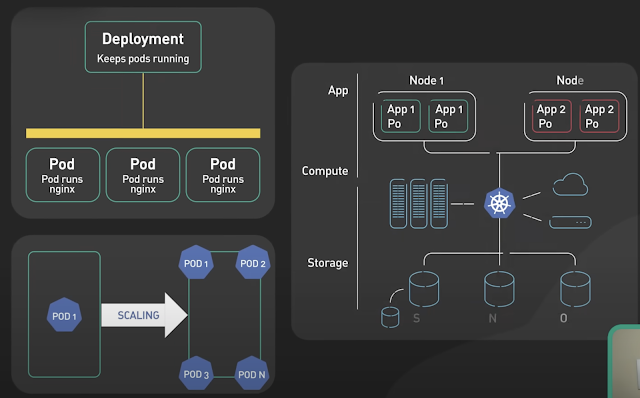
Basics of Kubernetes
Kubernetes, often abbreviated as K8s , is an open-source platform designed to automate the deployment, scaling, and management of container...
-
The Unix top command is designed to help users determine which processes are running and which applications are using more memory or process...
-
Rotating MySQL Log Files on Linux. A. Check logrotate must on daily cron #less /etc/cron.daily/logrotate B. Check on logrotate.d there must ...
-
Security Issues with MySQL ROOT Access MySQL offers simple but very effective security mechanisms. Unfortunately, the default installation o...
